
Prompt vs Context vs Harness vs Loop Engineering
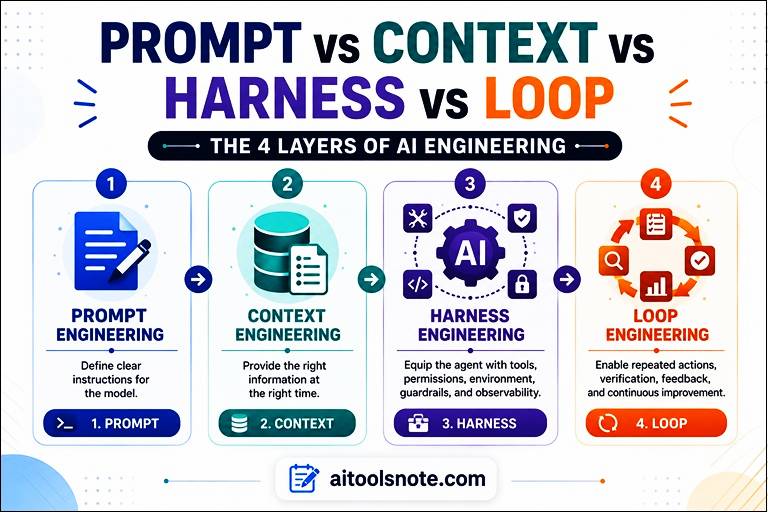 For a long time, improving an AI system meant improving the prompt. We learned to write clearer instructions, provide examples, define constraints, and tell the model exactly what kind of answer we wanted. This practice, known as prompt engineering, remains important. But as AI systems have evolved from simple chatbots into agents that can search the web, use tools, write code, access files, call APIs, and work through multi-step tasks, the prompt is no longer the whole system.
Consider a simple request such as:
“Write a summary of this document.”
A well-designed prompt may be all you need.
Now consider a much harder task:
“Analyze our latest customer complaints, identify the most important product issues, check whether engineering has already fixed them, update the project tracker, and prepare a report for the product team.”
This task requires much more than a good instruction. The AI needs access to the right documents and customer data. It needs tools to search systems and update records. It needs rules defining what it is allowed to change. It needs a way to check whether its actions worked. And if something fails, it needs to decide what to try next.
This is where context engineering, harness engineering, and loop engineering enter the picture.
A useful way to think about the evolution is:
Anthropic describes context engineering as a broader evolution from prompt engineering, focused on curating the information available to a model at inference time. OpenAI’s 2026 work on harness engineering extends the focus to agent-friendly environments, tools, architecture, observability, and feedback. IBM’s recent definition of loop engineering focuses on the iterative agent cycle itself.
Why These Four Concepts Matter
For a simple chatbot question, a good prompt may be enough.
For example:
Explain photosynthesis to a 12-year-old using a simple analogy.
But consider a coding agent asked to:
Find a bug, modify the repository, run tests, investigate failures, fix the implementation, open a pull request, and keep working until the acceptance criteria are satisfied.
A single prompt cannot reliably define the entire operating environment.
The agent may need:
- Repository instructions
- Relevant source files
- Previous decisions
- Documentation
- Tool access
- Shell access
- Tests
- Logs
- Browser access
- Permissions
- A workspace
- Error feedback
- Persistent state
- A stopping condition
- Human escalation
This is where the four concepts become useful.
Prompt vs Context vs Harness vs Loop Engineering
| Engineering layer | Main question | What you design | Typical example |
|---|---|---|---|
| Prompt engineering | What should I tell the model? | Instructions, examples, constraints, output format | “Summarize this report in 5 bullets” |
| Context engineering | What should the model know? | Documents, memory, retrieved data, history, tool results | Give an agent the relevant API docs |
| Harness engineering | What environment should surround the model? | Tools, permissions, tests, sandboxes, observability, guardrails | Give a coding agent a safe repo with tests |
| Loop engineering | How should the system keep working? | Triggers, retries, verification, state, stopping rules | Fix bugs until tests pass, then open a PR |
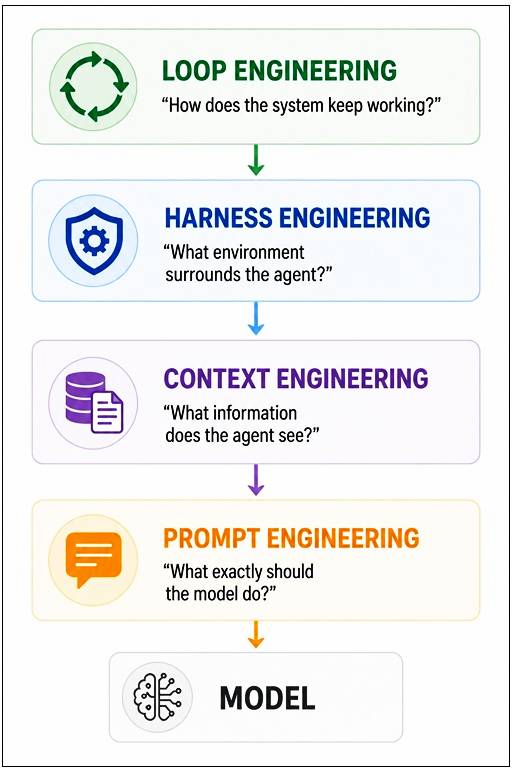
These boundaries are not absolute. A production agent often uses all four simultaneously.
How Prompt Engineering Works
Prompt engineering is the practice of designing instructions that make an AI model more likely to produce the desired result.
It is most visible in ordinary ChatGPT, Claude, Gemini, and API interactions.
Weak prompt
Write a blog post about cybersecurity.
Better prompt
Write a 1,500-word beginner-friendly article about phishing attacks.
Audience: Non-technical business professionals.
Requirements: – Explain phishing in plain English.
– Give 5 realistic examples.
– Include warning signs.
– Explain what to do after clicking a suspicious link.
– Use short paragraphs.
– End with a practical checklist.
Do not invent statistics.
The second prompt reduces ambiguity.
What Prompt Engineering Controls
You can use prompting to specify:
- Role
- Objective
- Audience
- Constraints
- Tone
- Examples
- Output format
- Evaluation criteria
- Available information
- Task boundaries
Prompt Engineering Flow
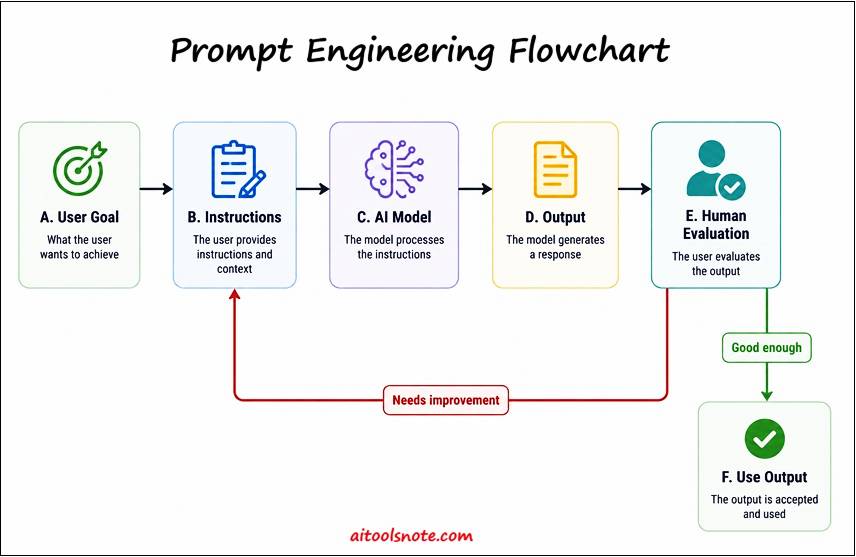
The important point is that prompt engineering primarily operates at the instruction layer.
It becomes less sufficient as tasks become longer, tool-driven, stateful, and autonomous.
How Context Engineering Works
Context engineering is about selecting and organizing the information available to the model when it makes a decision.
Anthropic describes context as the set of tokens available to the model during inference. That can include system instructions, tools, external information, message history, and other state. The goal is not simply to provide more information, but to provide useful information with high signal and low noise.
Think of the difference between a prompt and context like this:
Prompt: “Analyze this company’s financial health.”
Context: The company’s financial statements, previous reports, accounting definitions, industry benchmarks, recent announcements, and the user’s analytical requirements.
The instruction tells the model what to do.
The context gives it the information needed to do it.
Example: Customer Support Agent
A prompt might say:
Help the customer solve their problem.
Be polite and never invent an answer.
That is useful, but insufficient.
A context-engineered system could provide:
SYSTEM RULES
↓
Customer profile
↓
Current conversation
↓
Product documentation
↓
Relevant support articles
↓
Previous support tickets
↓
Current account status
↓
Available actions
↓
Company policies
Now the model has a much stronger information environment.
Context Engineering Flow
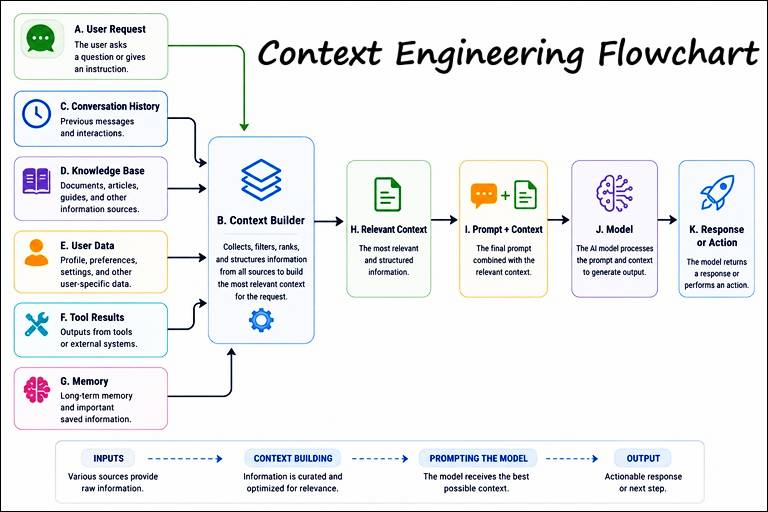
The key lesson is simple:
If the model does not have the information it needs, rewriting the prompt may not solve the problem.
How Harness Engineering Works
Harness engineering focuses on the environment surrounding an AI agent.
The term has become particularly prominent in agentic software development. OpenAI’s February 2026 engineering report describes an agent-first development environment in which engineers focused on tools, repository structure, feedback loops, observability, architecture constraints, and other mechanisms that helped Codex agents work reliably.
A useful analogy is a horse and harness.
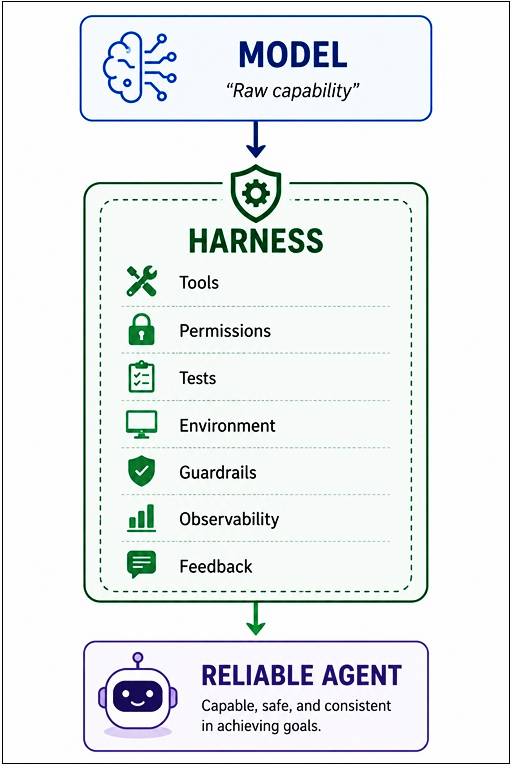
The model supplies intelligence.
The harness determines how that intelligence can interact with the environment.
Coding Agent Example
Imagine asking an AI coding agent:
Fix the authentication bug.
With no harness, the agent may have limited visibility and no way to verify the fix.
With a stronger harness, it could have:
Repository
↓
AGENTS.md / project instructions
↓
Isolated worktree
↓
Source code
↓
Terminal access
↓
Test suite
↓
Linting
↓
Application logs
↓
Browser testing
↓
Pull request workflow
OpenAI describes a similar approach in its Codex experiment, including isolated worktrees, browser interaction, logs, metrics, traces, repository-embedded skills, structural tests, and mechanically enforced architecture rules.
Harness Engineering Flow
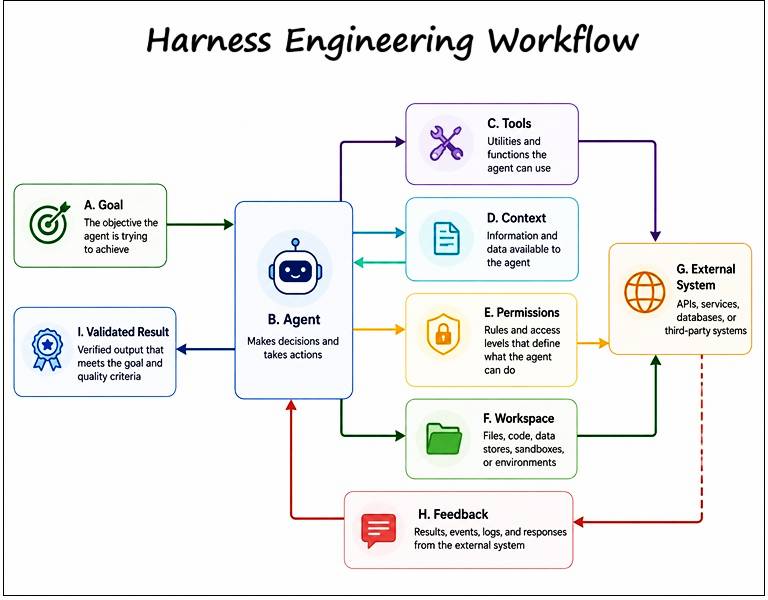
Harness engineering asks:
What must we build around the model so that it can do useful work safely and repeatedly?
How Loop Engineering Works
Loop engineering focuses on the repeated cycle an AI agent follows while working toward a goal.
IBM defines loop engineering as designing agentic workflows that allow agents to act, observe results, make decisions, and iterate toward user-defined goals with minimal human intervention.
Instead of this:
Human → Prompt → AI → Answer
Human → Prompt → AI → Answer
Human → Prompt → AI → Answer
Human → Prompt → AI → Answer
You build this:
Goal
 ↓
Plan
 ↓
Act
 ↓
Observe
 ↓
Verify
 ↓
Correct
 ↓
Repeat
 ↓
Done?
 ├── No → Continue
 └── Yes → Stop
A Practical Agent Loop
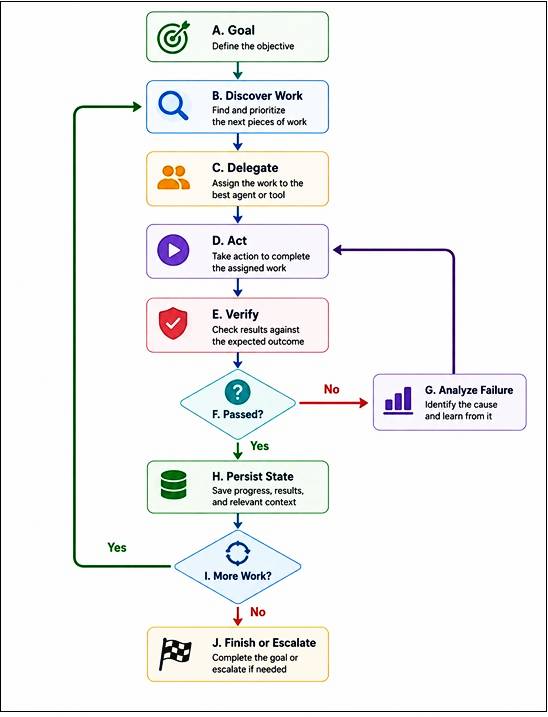
This changes the human’s role.
Instead of repeatedly asking:
“What should I tell the AI next?”
The human starts asking:
“What loop should the system run?”
That shift is one of the central ideas behind loop engineering.
How the Four Layers Work Together
The four concepts become much clearer when combined.
Imagine building an AI agent that maintains a software project.
Layer 1: Prompt Engineering
Tell the agent what the current task is.
Fix the failing checkout test.
Do not change the public API.
Run the relevant tests after making the change.
Layer 2: Context Engineering
Give it:
- Relevant source files
- Failing test output
- Architecture documentation
- Previous decisions
- Repository instructions
- Recent changes
Layer 3: Harness Engineering
Give it:
- Terminal access
- Isolated worktree
- Test runner
- Linter
- Browser
- Logs
- Restricted credentials
- Automated checks
Layer 4: Loop Engineering
Define:
1. Find the failure.
2. Reproduce it.
3. Identify the likely cause.
4. Implement a fix.
5. Run tests.
6. Inspect failures.
7. Revise if necessary.
8. Repeat within the budget.
9. Stop when acceptance criteria pass.
10. Escalate if verification remains inconclusive.
Now the system is much more than a prompt.
It is an engineered agent workflow.
Real-World Example: AI Research Agent
Suppose you want an AI system to produce a weekly competitor report.
Prompt Engineering
Create a weekly competitor intelligence report.
Highlight important product, pricing, and positioning changes.
Cite sources for factual claims.
Context Engineering
The system retrieves:
Competitor websites
Product pages
Previous reports
Pricing pages
Press releases
Company announcements
Industry notes
Harness Engineering
The agent receives:
Web search
Browser Source extraction
Document storage
Citation validation
Structured report generator
Loop Engineering
The system runs every Monday:
Monday 08:00
   ↓
Find new competitor changes
   ↓
Collect sources
   ↓
Filter duplicates
   ↓
Analyze changes
   ↓
Verify important claims
   ↓
Generate report
   ↓
Compare with previous week
   ↓
Save report
   ↓
Notify team
This is why these concepts should not be treated as four competing replacements for one another.
They solve different problems.
Prompt Template Examples
Prompt Template 1: Better Single-Shot Prompt
You are a senior technical writer.

Task:
Explain [TOPIC] to [AUDIENCE].

Goal:
The reader should be able to [DESIRED OUTCOME].

Requirements:
- Start with a simple definition.
- Use one practical analogy.
- Give 3 real-world examples.
- Define technical terms immediately.
- Use short paragraphs.
- Include a practical checklist.

Output format:
1. Quick answer
2. Explanation
3. Examples
4. Common mistakes
5. Practical takeaway

Before answering, check that every requirement is satisfied.
Use this when: the task is mostly one-shot and the necessary information is already available.
Prompt Template 2: Context-Aware Agent
Your task is to analyze the customer's support request.

Use the supplied context as the source of truth.

Customer request:
{{customer_message}}

Customer information:
{{customer_profile}}

Relevant product documentation:
{{retrieved_docs}}

Previous support history:
{{support_history}}

Rules:
- Do not invent account information.
- If the supplied context is insufficient, say what information is missing.
- Separate confirmed facts from assumptions.
- Recommend only actions permitted by the available policy.

Return:
1. Problem summary
2. Relevant evidence
3. Recommended action
4. Missing information
Use this when: the model’s answer depends heavily on external information.
Prompt Template 3: Verification Loop
You are an implementation agent.

Goal:
{{goal}}

Acceptance criteria:
{{criteria}}

For each iteration:

1. Inspect the current state.
2. Identify the smallest useful next action.
3. Make the change.
4. Run the required verification.
5. Inspect the result.
6. If verification fails, use the evidence to revise the approach.
7. If verification passes, check every acceptance criterion again.

Never claim the task is complete without evidence.

Stop when:
- All acceptance criteria pass, or
- The task cannot safely continue.

If blocked, report:
- What was attempted
- What failed
- Evidence of failure
- What human intervention is required
Use this when: the agent must repeatedly act and verify rather than generate a single response.
Prompt Template 4: Harness Specification
Design the execution environment for an AI coding agent.

Goal:
{{goal}}

The agent must be able to:
- Read relevant repository files
- Modify code
- Run tests
- Inspect logs
- Work in isolation
- Create a pull request

The environment must enforce:
- Read/write permissions
- Test requirements
- Security boundaries
- Maximum execution time
- Human approval before production deployment

Identify:
1. Required tools
2. Required context
3. Permissions
4. Verification mechanisms
5. Observability
6. Failure recovery
7. Human escalation points
This is not merely a prompt for the agent.
It is a prompt for designing the agent’s operating environment.
When Should You Use Each?: Prompt Engineering vs Context Engineering vs Harness Engineering vs Loop Engineering
Use prompt engineering when:
- The task is short.
- The model already has the required information.
- You need better output formatting.
- The main problem is ambiguous instructions.
Use context engineering when:
- The model lacks relevant information.
- The task depends on documents or databases.
- Conversation history is important.
- Retrieval quality is limiting performance.
- The model receives too much irrelevant information.
Use harness engineering when:
- The model needs tools.
- The agent modifies files or systems.
- Security and permissions matter.
- You need automated tests.
- You need observability and recovery.
- Reliability matters more than a good demo.
Use loop engineering when:
- Work requires multiple iterations.
- Verification is possible.
- Tasks can be repeated.
- Humans are spending time issuing follow-up prompts.
- The agent needs to decide what to do next.
- You want scheduled or event-driven agent work.
A Simple Decision Tree
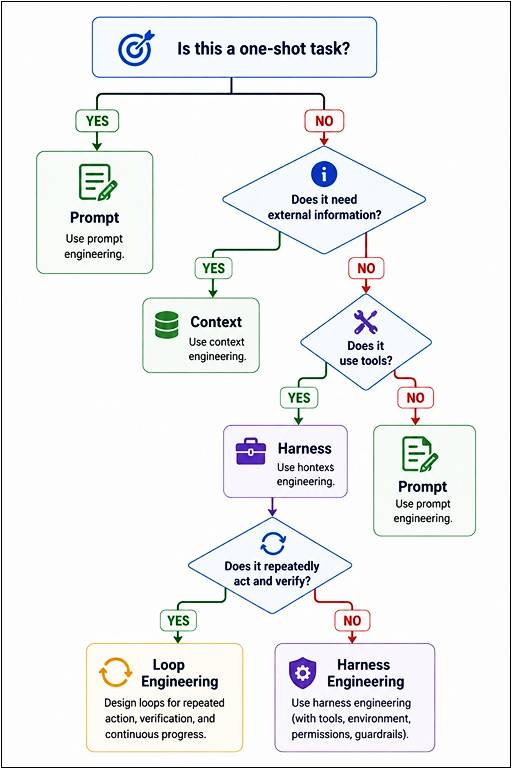
In real systems, the answer is often all four.
Common Mistakes
1. Trying to solve every problem with a better prompt
If the agent cannot access the database, adding another paragraph to the prompt will not fix the problem.
Better approach: fix the context or tool layer.
2. Giving the model everything
More context does not automatically mean better context.
Anthropic emphasizes the importance of selecting high-signal information because context is a finite resource.
Better approach: retrieve, filter, summarize, and prioritize.
3. Giving an agent powerful tools without verification
An agent with shell access but no tests or guardrails can produce fast mistakes.
Better approach: pair action capabilities with deterministic checks, permissions, isolation, and observability.
4. Building a loop without a stopping condition
A loop that simply says “try again until it works” can waste tokens, time, and money.
A production loop needs:
Goal, Verifier, Retry policy, Budget, State, Stop condition, Escalation path
IBM similarly highlights bounded, efficient loops with verification and termination behavior.
5. Confusing agent autonomy with reliability
An autonomous agent is not automatically a reliable agent.
Reliability comes from the surrounding system:
Good model
+
Good context
+
Good tools
+
Good verification
+
Good state
+
Good stopping rules
=
Better agent system
Practical Takeaway: What Should You Do Right Now?
Take one AI workflow you already use.
For example:
“I ask ChatGPT to review my code.”
Now ask four questions:
Prompt:
Is my instruction clear?
Context:
Does the AI have the right files, requirements, and previous decisions?
Harness:
Can the AI run tests or inspect the system safely?
Loop:
Can it review its own changes, verify the result, fix failures, and know when to stop?
That exercise quickly reveals where your current AI workflow is weak.
FAQs
Is prompt engineering becoming obsolete?
No. Prompt engineering remains an important part of AI systems. The shift is that prompts are increasingly only one layer of a larger system. Context engineering manages information, harness engineering manages the surrounding environment, and loop engineering manages repeated agent execution. Anthropic explicitly describes context engineering as an evolution of prompt engineering rather than its replacement.
What is the difference between context engineering and harness engineering?
Context engineering focuses primarily on what information reaches the model. Harness engineering focuses on the larger environment around the agent, including tools, permissions, execution environments, feedback, testing, architecture, and observability.
What is the difference between harness engineering and loop engineering?
Harness engineering focuses on the environment that makes an agent capable and controllable. Loop engineering focuses on the repeated execution cycle that determines how work is attempted, verified, corrected, and continued. They overlap heavily in production agent systems. IBM’s 2026 description of loop engineering explicitly includes context, tools, hooks, worktrees, skills, subagents, and persistent state as parts of effective loops.
Do normal ChatGPT users need harness or loop engineering?
Usually not. If you are asking questions, writing content, brainstorming, or analyzing a document, prompt and context engineering are often enough. Harness and loop engineering become more relevant when AI starts taking actions, using tools, modifying systems, or operating for longer periods.
Conclusion: The Four Layers of Modern AI Engineering
The easiest way to remember the difference is:
Prompt engineering tells the model what to do. Context engineering gives it the information it needs. Harness engineering gives it a reliable environment in which to work. Loop engineering determines how the work continues, gets verified, and eventually stops.
The important shift is not that prompt engineering is dead.
It is that the prompt is becoming one component inside a much larger engineered system.
For simple tasks, start with the prompt.
When information is missing, improve the context.
When the agent needs tools and safeguards, build the harness.
When the work needs repeated action and verification, engineer the loop.
That is the practical path from chatting with AI to building reliable AI systems.
What to Explore Next: Learn about RAG and context engineering, AI agent architecture, tool calling, agent evaluation, and human-in-the-loop workflows.
Try This: Pick one repetitive AI task you perform every week and map it across the four layers. You will often find that the biggest improvement does not come from rewriting the prompt.
References:
Effective context engineering for AI agents – Anthropic
OpenAI’s harness engineering guide
Unlocking the Codex harness – OpenAI
What Is Loop Engineering? – IBM
You may also go through:
Open-Context Prompts vs Closed-Context Prompts
Top 10 Prompt Engineering Best Practices
How to Build an AI Research Workflow Using ChatGPT and NotebookLM (2026)
How to create a Custom AI Agent: A Comprehensive Guide
Top 40 AI Powered Tools to Automate Your Work