
How to Build an AI Research Workflow Using ChatGPT and NotebookLM (2026)
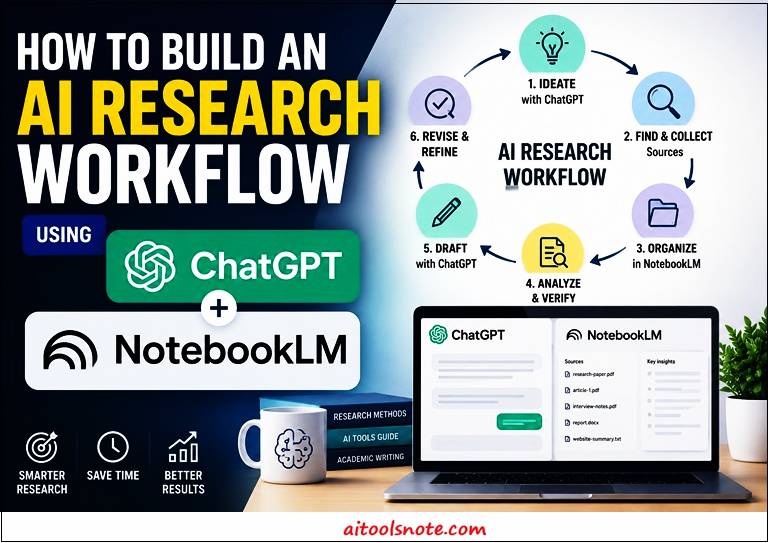 I used to do all my research inside one tab. ChatGPT open, fifteen messages deep into a rabbit hole, copying half-remembered facts into a Google Doc and hoping I’d cited the right source. It worked, until it didn’t. One afternoon I quoted a “fact” ChatGPT had confidently made up, and I didn’t catch it until a reader pointed it out in the comments.
That was the day I stopped treating ChatGPT as my only research tool and started building an actual workflow. Today that workflow runs on two tools, not one: ChatGPT for the messy, creative front end, and NotebookLM for the grounded, source-locked back end. Here’s exactly how it works.
Why You Shouldn’t Rely on One AI Tool
Every AI tool has a personality, whether the companies admit it or not. ChatGPT is the brainstorming friend who talks fast, throws out ten ideas a minute, and occasionally makes things up with total confidence. NotebookLM is the quiet librarian who won’t say a word unless it’s sitting right there in the source material you gave it.
Using only ChatGPT for research means you’re trusting a model that generates plausible-sounding text, not one that’s checking a reference shelf before it answers you. Using only NotebookLM means you get grounded answers, but you lose the fast, divergent thinking that helps you figure out what to even research in the first place.
The workflow that actually works pairs the two: use the tool built for exploration to explore, and the tool built for grounding to ground. Neither one alone gives you the full picture, but together they cover each other’s blind spots almost perfectly.
ChatGPT vs NotebookLM: What Each Does Best
Before you build a workflow, it helps to be honest about what each tool is actually good at, instead of trying to force one tool to do the other’s job.
The short version: ChatGPT is your idea engine. NotebookLM is your fact engine. Confusing the two is where most AI-assisted research workflows quietly break down.
Steps to Build an AI Research Workflow Using ChatGPT and NotebookLM
Step#1: Brainstorm Topics with ChatGPT
Every piece of research starts messy, and that’s fine. This is the stage where I open ChatGPT and just talk through what I’m curious about, without worrying yet about accuracy or sources.
I usually start broad and let ChatGPT narrow things down with me. Something like: “I want to write about how AI is changing research workflows for solo content creators. Give me 10 possible angles, ranked by how underexplored they are.” From there, I pick two or three angles that feel fresh, and I ask follow-up questions to stress-test them: “What would a skeptic say is wrong with this angle?”
This stage is entirely about volume and speed, not precision. ChatGPT is happy to generate twenty half-formed ideas in the time it would take me to think of three on my own. The goal here isn’t to trust anything ChatGPT tells me as fact, it’s to use it as a thinking partner that helps me figure out what questions are even worth researching properly.
By the end of this step, I usually have a rough thesis, a handful of sub-questions, and a mental map of what I need to go verify. That’s the handoff point to NotebookLM.
Step#2: Collect and Organize Sources in NotebookLM
Once I know roughly what I’m researching, I stop brainstorming and start collecting. This is where NotebookLM earns its place in the workflow, because it’s built specifically to work with a defined set of sources rather than the open internet.
I gather everything relevant: PDFs, saved articles, transcripts, even my own old notes, and upload them directly into a new NotebookLM notebook. I try to be generous here rather than picky, since NotebookLM’s real strength shows up once it has enough material to cross-reference. A notebook with three sources feels thin. A notebook with fifteen to twenty sources starts feeling genuinely useful.
I also organize sources by rough category as I upload them, sometimes literally naming files like “Angle 1 – Background” or “Angle 2 – Counterarguments,” since that small bit of structure makes it easier later to ask NotebookLM to focus on a specific subset of sources rather than everything at once.
This step feels slow compared to the ChatGPT brainstorm, and that’s intentional. Research quality is mostly determined by how good your source pile is, not by how clever your questions are afterward.
Step#3: Analyze and Verify Information with NotebookLM
This is the step that actually saved me from repeating that embarrassing made-up-fact mistake. Once my sources are loaded, I start asking NotebookLM direct questions, the same sub-questions I generated back in Step 1, and I pay close attention to how it answers.
The difference from ChatGPT is immediate. NotebookLM won’t just tell you something confidently, it points back to which source and often which passage the answer came from. If I ask “What’s the strongest counterargument to this angle?” and NotebookLM can’t find anything relevant in my uploaded sources, it tells me that too, instead of inventing a plausible-sounding answer.
I use this stage to specifically hunt for contradictions between sources, since that’s usually where the most interesting research angles hide. A prompt I use constantly here: “Do any of these sources disagree with each other on this point? Show me where.” NotebookLM is genuinely good at surfacing that kind of friction, which ChatGPT can’t do reliably because it isn’t reading your specific source set.
By the end of this step, I have verified facts, direct source citations, and a much clearer sense of which of my original brainstormed angles actually hold up under scrutiny.
Step#4: Draft and Refine Content in ChatGPT
With verified facts and source-backed notes in hand, I go back to ChatGPT for the part it’s genuinely excellent at: turning research into readable content. This is where the two tools hand off to each other one more time.
I paste in my verified notes from NotebookLM along with a clear instruction, something like: “Here are verified facts and quotes from my research. Draft an outline for an article using only these points, and flag anywhere you think a transition or example is needed.” Because I’m explicitly feeding it grounded information rather than asking it to recall facts from memory, the hallucination risk drops sharply at this stage.
From there, it’s the usual iterative back-and-forth: draft a section, review it, ask ChatGPT to tighten a paragraph or adjust the tone, repeat. I still fact-check anything that sounds slightly off during this drafting stage, since ChatGPT can occasionally reshape a fact subtly while rewriting it for flow, but the core information itself is no longer coming from an ungrounded model guessing at the truth.
This step is also where voice and personality come back into the piece. NotebookLM output tends to read a bit dry and reference-heavy, which is exactly what you want for verification but not for a finished article. ChatGPT is where that verified skeleton turns into something people actually want to read.
Case Studies: This Workflow in Action
Here’s what this workflow actually looked like in practice, across five different research projects.
Case Study 1: The Product Comparison That Almost Went Wrong
I was writing a comparison piece on two competing SaaS analytics tools. I asked ChatGPT to brainstorm the ten most important comparison angles, and it confidently listed pricing tiers for both products, down to specific dollar figures. It sounded exact and authoritative.
Before writing a word, I uploaded both tools’ actual pricing pages, along with two independent review articles, into NotebookLM and asked it to confirm the pricing ChatGPT had given me. Two of the four numbers were wrong, one was an outdated tier that had been discontinued months earlier. If I’d published the ChatGPT numbers directly, I’d have misled readers making an actual purchase decision. The fix took ten minutes in NotebookLM. The damage from not checking would have taken a lot longer to undo.
Case Study 2: Turning Twelve Scattered PDFs Into One Coherent Argument
For a longer piece on remote work productivity trends, I had collected twelve different sources over several months: a mix of survey reports, blog posts, and one academic paper, all sitting in random folders on my laptop. Individually, none of them told a clear story.
I uploaded all twelve into a single NotebookLM notebook and asked, “What do these sources agree on, and where do they disagree?” NotebookLM surfaced something I hadn’t noticed on my own: three of the survey reports defined “remote work” differently, which meant their headline statistics weren’t actually comparable to each other. That single insight became the most interesting section of the finished article, and it’s not something ChatGPT could have found, since it never had access to those specific twelve documents in the first place.
Case Study 3: Catching a Contradiction Before an Interview-Style Article
I was writing an explainer on a recent AI regulation update, sourced mostly from official government press releases and a couple of news articles covering the same announcement. ChatGPT’s initial draft, based on general knowledge, stated the new rules would apply starting the following quarter.
When I ran the actual press release text through NotebookLM and asked for the specific effective date mentioned in the source, it returned a different date entirely, several weeks earlier than what ChatGPT had assumed. NotebookLM even pointed to the exact paragraph in the press release where that date appeared. That’s the kind of small, specific error that’s easy to miss if you’re skimming your own draft, but obvious the moment you ask a tool to check only what the source document actually says.
Across all three cases, the pattern was identical: ChatGPT produced something fluent and confident, and NotebookLM caught the gap between “sounds right” and “is right.” That gap is exactly what this workflow is designed to close.
Case Study 4: Rebuilding a Client Report After ChatGPT Filled in a Gap
I was helping a friend put together a competitive landscape summary for a small business pitch deck. She’d fed ChatGPT a rough list of five competitors and asked for a summary of each one’s core offering. Four of the five summaries were accurate. The fifth one was for a smaller regional company, and ChatGPT, lacking solid training data on it, quietly generated a plausible-sounding description that blended details from a similarly named but unrelated business.
We only caught it because we ran the same five companies through NotebookLM, this time uploading each company’s actual “About” page and one recent press mention as sources. NotebookLM refused to confidently describe the fifth company’s offering beyond what was explicitly stated in the uploaded pages, and flagged that the source material didn’t mention two of the claims ChatGPT had included. That refusal was the tell. If NotebookLM won’t state something confidently from the actual source, it’s a strong signal that ChatGPT invented it. The pitch deck got fixed before it ever reached a client meeting.
Case Study 5: Untangling Conflicting Statistics in a Health and Wellness Piece
A subscriber once asked me to help fact-check a draft article on sleep and productivity that cited three different statistics, “adults need 7 to 9 hours of sleep,” “60 percent of professionals are sleep-deprived,” and “sleep debt costs the economy billions annually,” all pulled from a mix of ChatGPT-assisted writing and quick Google searches. None of the numbers were sourced with a specific citation, which made the whole article feel shakier than it needed to be.
We gathered the four original studies the numbers seemed to trace back to and loaded them into a single NotebookLM notebook. Asking “which of these three statistics is directly supported by the uploaded studies, and which isn’t” was clarifying in a way a plain Google search never had been. Two of the three numbers checked out exactly as stated.
The third, the “billions annually” economic cost figure, turned out to be from a study covering a different country’s economy than the one referenced in the draft, a detail that had gotten lost somewhere between the original research and the ChatGPT-assisted rewrite. Swapping in the correctly sourced regional figure took one more NotebookLM query, and the final article shipped with an actual footnote linking to the right study instead of a vague, unverifiable claim.
Common Mistakes That Reduce Research Quality
I’ve made most of these mistakes myself, usually right before publishing something I later had to quietly edit.
-
Treating ChatGPT’s confident tone as a signal of accuracy, when confidence and correctness are completely unrelated in how these models generate text
-
Uploading too few sources into NotebookLM, then being surprised when its answers feel thin or generic
-
Skipping the verification step entirely because the ChatGPT draft “sounded right”
-
Asking NotebookLM questions that go beyond what your uploaded sources actually cover, then being confused when it says it doesn’t know
-
Never checking for contradictions between sources, which means you miss the most interesting parts of your own research
-
Using the same tool for both brainstorming and fact-checking, which quietly removes the safety net this whole workflow depends on
Almost all of these come down to one root issue: forgetting that ChatGPT and NotebookLM are solving different problems, and trying to make one tool do both jobs badly instead of two tools doing one job each well.
Best Prompts for ChatGPT and NotebookLM
A few prompts I return to constantly, split by tool since they’re built for different jobs.
For ChatGPT (brainstorming and drafting):
-
“Give me 10 angles on [topic], ranked from most obvious to most underexplored.”
-
“What would a smart skeptic say is wrong with this idea: [idea]?”
-
“Here are my verified notes: [paste notes]. Draft an outline using only these points.”
-
“Rewrite this paragraph in a more conversational tone without changing any facts.”
For NotebookLM (verification and analysis):
-
“Based only on the uploaded sources, what is the strongest evidence for [claim]?”
-
“Do any of these sources contradict each other on [topic]? Show me exactly where.”
-
“Summarize what these sources say about [sub-question], and tell me if any source doesn’t address it.”
-
“What’s a question about this topic that none of my sources actually answer?”
That last NotebookLM prompt is quietly one of the most useful. It tells you exactly where your research has a gap, which is often more valuable than another confirmed fact.
FAQs
Q1: What is the best AI research workflow using ChatGPT and NotebookLM?
A1: The most reliable workflow uses ChatGPT to brainstorm topics and questions, then NotebookLM to verify facts against uploaded source documents before drafting the final content in ChatGPT.
Q2: Why does ChatGPT sometimes give wrong facts during research?
A2: ChatGPT generates plausible-sounding text based on patterns in its training data rather than checking a specific source, which can lead to confidently stated but inaccurate information, especially for niche or recent topics.
Q3: Can NotebookLM replace ChatGPT for research?
A3: No, NotebookLM only answers based on documents you upload and isn’t designed for open-ended brainstorming, so it works best paired with ChatGPT rather than as a full replacement.
Q4: How many sources should I upload to NotebookLM for good results?
A4: Aim for at least ten to twenty relevant documents per notebook, since NotebookLM’s cross-referencing and contradiction-detection features improve significantly with a larger source pool.
Q5: How do I stop AI hallucinations in content research?
A5: Ground your research in tools like NotebookLM that answer only from uploaded sources, and always verify any specific statistic, date, or claim generated by ChatGPT against a primary source before publishing.
Conclusion: A Repeatable AI Research Workflow
The workflow isn’t complicated once you stop trying to make one tool do everything. Brainstorm wide with ChatGPT, ground your sources in NotebookLM, verify hard against those sources, then hand the verified material back to ChatGPT to actually become something readable.
What changed for me isn’t that I do more research now, it’s that I trust the research I do produce. That embarrassing made-up-fact moment hasn’t happened again since I split brainstorming from verification, and honestly, that alone made switching to this two-tool workflow worth it.
If you’re building your own AI-assisted research process, start small: pick one upcoming piece, run it through these four steps end to end, and see how much of your final draft actually survives the NotebookLM verification stage. You’ll probably be surprised by how much you would have gotten wrong without it.
References:
-
Google NotebookLM official page: “NotebookLM“
-
OpenAI ChatGPT documentation: “ChatGPT capabilities“
You may also go through:
How to use NotebookLM: A Comprehensive Guide
How to Generate Human-like Content with ChatGPT?
Comparing AI Models- Gemini 3 Pro vs ChatGPT vs Claude vs Llama
ChatGPT vs DeepSeek vs Grok vs Gemini vs Claude
Prompt vs Context vs Harness vs Loop Engineering